

Field notes: known issues and gotchas
Symptom → cause → fix, collected from real VCF upgrades. A companion to the Full VCF upgrade sequence – that doc gives the sequence; this doc is the list of things that went wrong and how they were cleared.
Scope. These were observed on a VCF 5.2.2 → 9.0.2 multi-domain upgrade (management domain, several workload clusters, a new VKS workload domain, the full VCF Operations / Logs / Networks / Automation / Identity Broker stack). Most apply to any 5.2 → 9.x upgrade. KB numbers and component versions are 9.0.x-era – re-check them for your target build.
Entitlement and the depot download token
- 403 Forbidden downloading the SDDC Manager 9 bundle. The customer’s Broadcom account lacked the entitlement. Broadcom’s Customer Sales team fixes it on the account; a personal Broadcom account is a stopgap for the first download.
- The depot token lives in three places and drifts. SDDC Manager, Fleet Manager, and vCenter’s Lifecycle Manager each hold a download token. After the vCenter 9 upgrade the vCenter LCM token can silently stop matching the one SDDC Manager and Fleet Manager use – depot sync keeps working everywhere except vCenter, and ESXi images disappear from the vCenter depot. A vUM database reset does not fix it (and on 8.0 U3 / 9.0.x a reset breaks Supervisor environments on the later 9.1 upgrade – see A past vLCM database reset deletes Supervisor VMs). Correct the token in vCenter’s Lifecycle Manager settings. The four token URLs, the click path, and a failure table for adding them behind a proxy: vCenter proxy configuration → Lifecycle Manager download sources.
VCF Operations upgrade and the “back in time” trap
- “Back in time” upgrade. A component patch released after a target VCF build cannot upgrade to that build – the version graph treats it as going backwards, and it is explicitly unsupported. Example: Aria Operations 8.18.5 shipped after VCF 9.0 and 9.0.1, so 8.18.5 → 9.0.0 / 9.0.1 was blocked and the only path was to wait for 9.0.2. This is the same trap the overview’s source-patch-level note describes – always check the interop matrix from the exact running patch.
- A vRSLCM-managed product can only be upgraded through vRSLCM. Not outside it, not by removing and re-adding the product, not by downgrading to an older patch. If vRSLCM does not offer the target, the target is not reachable yet.
- vIDM patch ordering matters. Applying the older security patch before the newer one broke the Identity Manager cluster and forced a restore-from-backup. Apply the current CSP patch directly (alongside the required vRSLCM patch), not in sequence with superseded ones. Take a backup first.
- Operations for Logs has no upgrade path – a fresh 9.x deployment, then migrate the configuration and (optionally) the log data; the old appliance can run in parallel for retention. Point log agents at the new server.
- APUAT against an offline cluster silently under-reports. Running the Pre-Upgrade Readiness Assessment Tool while the cluster was offline produced an empty Removed/Disconnected Metrics tab in the report – it looked like a clean “nothing affected” result rather than a failure. Re-running the same PAK with the cluster online populated the tab with the actual metric impacts. Always run APUAT against the online cluster – see APUAT procedure.
Fleet Manager / Fleet LCM migration – the layered failure chain
The migration from the vRSLCM-managed model to the Fleet Manager model can stall at stage 17 (“Migrate VCF Ops to Management Node”). It is a stack of independent problems, each masking the next:
- Port 443 blocked between Fleet Manager and the management vCenter node. Open it.
- vCenter rejects TLS 1.3. Error
LCMMANAGEMENTNODEVCFOPS12005(“failed pushing VCF Ops certificate to management node”); vCenter’srhttproxylog shows the cipher mismatch. Change the vCenter TLS profile from its restrictive default toCOMPATIBLE-NON-FIPS. - Incomplete certificate chain. The VCF Operations certificate must include the IP addresses of all cluster nodes. Regenerate it (CertGen / Lifecycle Manager) to embed every node IP, and authorize the VCF Operations Fleet Management API.
- Inverted
is_admin_nodeflag in the VCF Operations CASA database – the real primary node has itfalse, a non-primary has ittrue. LCM cannot find the master and loops, pushing proxy details to a null address (VropsAddressException: Invalid Operations master address,NullPointerException at VropsEndpoint.getVcfOpsProxy). This predates every migration attempt, so no amount of network or certificate work helps. Correct the flag in the CASA DB (primary →true, replica →false) with the cluster offline and snapshots taken; apply the cached roles fix (KB 368959). - If the LCM-driven migration still fails, abandon it: de-register VCF Operations from the vRSLCM environment, register Fleet Management against VCF Operations, and import VCF Operations into Fleet Manager manually.
Side effects seen during the loop: the VCF Operations admin account locks
itself out repeatedly (SDDC Manager hammering a connectivity retry loop);
Fleet Manager UI must be enabled (touch /var/lib/vrlcm/UI_ENABLED); the
integration procedure is KB 417122; a stale CASA service user can be removed
with a DELETE …/casa/auth/users call.
SDDC Manager
- 502 Bad Gateway after a clean upgrade. Services all report healthy but
the UI 502s. The VDT tool identifies a corrupted
/etc/hosts; KB 412614 rebuilds it.
vCenter Server Appliance shell
- SCP/WinSCP to the appliance fails with the default shell. The
appliance’s default login shell is
appliancesh, notbash– SCP clients need a real shell to negotiate the transfer, so any file copy (VDT, lsdoctor, a VIB, a remediation script) silently fails until it’s switched. Confirmed current on vCenter 9.0 as well as 7.x/8.x. Fix, from the appliance shell (console or SSH):
Reconnect, then SCP works. Revert withshell.set --enabled true shell chsh -s /bin/bash rootchsh -s /bin/appliancesh rootonce done. Full context: VDT and lsdoctor: self-service diagnostic tools.
Host profiles below 8.0 block the vCenter 9 upgrade
Field-observed on an 8.0.x → 9.x vCenter upgrade: the pre-upgrade check stops with an Error, not a warning:
Source vCenter Server has unsupported version of host profiles. Host profiles with versions lower than 8.0 are not supported by vCenter Server 9.0.0. Upgrade the [N] host profiles listed below to version 8.0 or later before proceeding with the upgrade of vCenter Server.
The check runs on every path – the manual GUI installer
(docs/07), and the SDDC Manager / VCF
Operations reduced-downtime upgrade, where it shows up as “The host
profiles are of version … which is lower than version 8.0.0” and fails
validation (KB 439270).
Per that KB, profiles created on 7.x use a metadata schema vCenter 9
can’t process. The error lists the offending profiles by name; the same
list is in /var/log/vmware/upgrade/vcdb_req.err on the source appliance
(KB 318864).
A host profile’s version is the ESX version of the host it was extracted from, not the version of the hosts it’s attached to. A cluster of 8.0 hosts still carrying a profile extracted back on 7.0 trips this check. Two ways out, both on the source vCenter before the upgrade:
- Profile still in use: extract a new profile from a host already on 8.0 or later, attach it to the cluster, check compliance and remediate, then delete the old profile. Hosts still on 7.x need to reach 8.0 first, since there’s no 8.0 host to extract from otherwise. Export the old profile and its host customizations first, so settings can be compared afterwards. Broadcom’s walkthrough of this flow is the KB the error cites, legacy KB 52932, now KB 318864 (written for older version pairs, same steps).
- Profile not in use: delete it – Policies and Profiles → Host Profiles → select the profile → Actions → Delete (KB 439270’s resolution). Leftover profiles from long-retired clusters are the usual case; check nothing is attached before deleting. This is the fix used in the field case above: none of the flagged profiles were attached to anything, so they were deleted rather than re-extracted.
Find old profiles ahead of the window instead of at the precheck (PowerCLI, from KB 318864):
Untested. Not yet run against a lab or field environment.
Get-VMHostProfile | ForEach-Object { $_.ExtensionData.Config.ApplyProfile.ProfileVersion + "`t" + $_.Name }Anything below 8.0 needs one of the two fixes above.
“Cannot find vSphere HA master agent” after the vCenter upgrade
Field-observed after a vCenter 9 upgrade: several clusters showed “Cannot find vSphere HA master agent”. It cleared on every cluster without intervention: as soon as the vLCM image tasks on a cluster completed or timed out, the HA election started and finished. Some clusters cleared sooner than others. The slower ones also had hosts in maintenance mode and disconnected hosts; one disconnected host was powered on along the way, but that turned out not to be what fixed it.
Wait for the image tasks first. On vLCM image-managed clusters, vCenter’s ImageService has to finish validating the depots after the upgrade before HA can configure the hosts. Watch the cluster’s image tasks in Recent Tasks; until they finish or time out, HA won’t elect a master. Broadcom puts that at “one to two hours”, and notes that turning HA off and on before then “does not resolve the issue” (KB 374242).
If a cluster is still stuck after its image tasks are done, work through these in order:
- Disconnected hosts. vCenter can’t push the new HA (FDM) agent to a host it can’t reach, and a not-responding host can block the cluster’s Remediate HA task (KB 449121). Reconnect it, or remove it from inventory if it’s actually retired. The KB’s further step edits the vCenter database: only with Broadcom support.
- Hosts in maintenance mode. These don’t take part in the HA master election. If every connected host in the cluster is in maintenance mode, there’s nothing to elect; bring at least one healthy host out.
- Pending reboots. A host with a staged patch, firmware or driver
change waiting for a reboot refuses live VIB installs, so the old FDM
agent can’t be replaced. Signs: HA state Uninitialized, and “Only
reboot-required installations are possible right now” in
/var/run/log/esxupdate.log. Fix: turn HA off on the cluster, put the host in maintenance mode, reboot it, exit maintenance mode, turn HA back on (KB 444836). - Reconfigure. Run Reconfigure for vSphere HA on the affected hosts. Only if that fails, turn HA off and back on at the cluster level (Configure → Services → vSphere Availability), which briefly leaves the cluster unprotected.
- HA still won’t enable on a vLCM cluster: the cluster image may be out of step with the hosts. Set the image’s ESX version to match the hosts, save to trigger a new compliance check, then enable HA (KB 445940, written for vCenter 9.0.2).
A 9.x license shows Assignable: No for vCenter
Field-observed: assigning the vCenter its 9.x license from VCF Operations (Licenses & Registration → Assign Primary License, with the vCenter selected) can show:
No licenses are assignable. Check the Assignable column below to view details.
The license table below the warning can take a moment to appear. It lists the 9.x license with Assignable: No, while Used Capacity is 0 cores and the full capacity shows as available. That looks like there is no capacity problem, but there is. Hover over the No in the Assignable column for the reason:
To assign this license, it must have allocated capacity of N cores
Assignment covers the whole vCenter at once. VCF Operations compares the cores the vCenter needs against the license’s Allocated Capacity, not against what is still free. If the requirement is higher, the license can’t be assigned at all, even with nothing used yet.
What counts toward the requirement:
- Every host the vCenter manages, ESX 8 hosts included. Hosts still on 8.x need their pre-9 key, but their cores also draw on the 9.x subscription (KB 441187, KB 445407).
- At least 16 cores per CPU. A CPU with fewer physical cores still counts as 16, so the requirement can exceed the real core count.
VCF Operations also shows the requirement before any license is assigned. Select the vCenter under Licenses → vCenter Systems. With no primary license, the detail panel’s This vCenter Instance Fully Licensed reads No (N unlicensed cores), and that N is the full requirement.
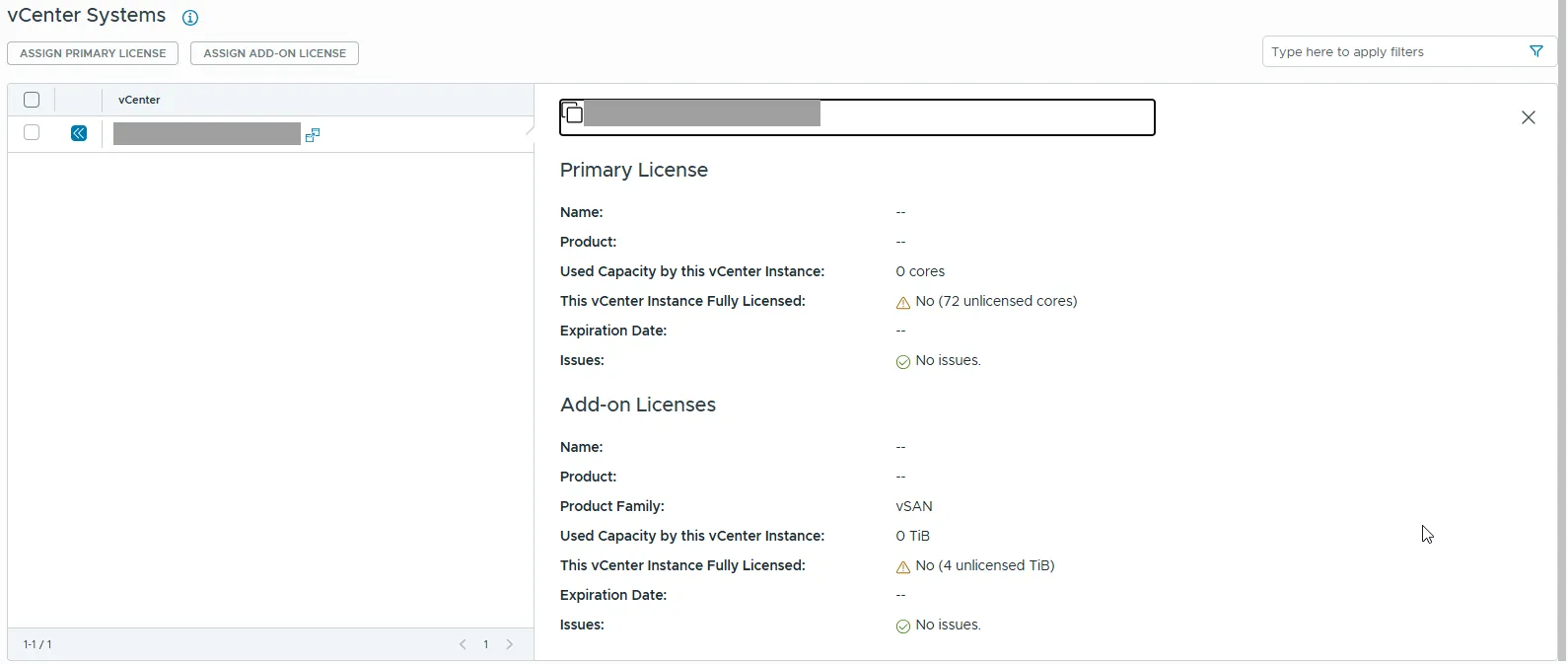
To work out the requirement yourself (Lab-verified 2026-10-15 on connected 9.0.2 hosts: 12-core CPUs counted as 16 and a 24-core CPU as 24, a total of 72. VCF Operations showed the same 72 unlicensed cores for that vCenter):
Get-VMHost | Select Name, ConnectionState,
  @{n='Sockets';e={$_.ExtensionData.Hardware.CpuInfo.NumCpuPackages}},
  @{n='LicCores';e={$s=$_.ExtensionData.Hardware.CpuInfo.NumCpuPackages; $c=$_.ExtensionData.Hardware.CpuInfo.NumCpuCores/$s; [math]::Max(16,$c)*$s}} |
  Tee-Object -Variable h; ($h | Measure-Object LicCores -Sum).Sum
Check every host has a Sockets value. A host with no CPU data throws a divide-by-zero error and counts as 0, so the sum comes out too low. Still untested: whether VCF Operations counts disconnected or maintenance-mode hosts, and whether a vSAN witness appliance in the inventory should be left out.
Ways to close the gap:
- Check for unallocated cores in the subscription. Allocated Capacity is what the Broadcom portal assigned to this license. If the entitlement is larger, raise the allocation there, then sync the License Server (connected) or re-import the license file (disconnected).
- Take hosts out of scope. Retired or spare hosts still in the vCenter inventory count. Removing them lowers the requirement.
- True up the missing cores with Broadcom or the reseller.
Meanwhile vCenter runs in 90-day evaluation mode until the license is assigned. There’s time, but the clock is running, so check the tooltip straight after the vCenter upgrade rather than at the end. An earlier field case cleared once the first host was on ESX 9. We haven’t confirmed whether that was related or whether the capacity changed in between, so treat the tooltip as the reason.
NSX and vCenter
-
Promote Manager-mode objects to Policy mode first. A mandatory NSX upgrade prerequisite (KB 385606) – any objects still in Manager mode block the upgrade.
-
Integrated Windows Authentication is gone in vCenter 9. The Active Directory domain join must be dissolved before the upgrade can proceed – unjoin gracefully per KB 373004.
-
The installer-UI vCenter upgrade path is deprecated – drive it from SDDC Manager / VCF Operations Fleet Management.
-
After the vCenter 9 upgrade, re-check the vCenter LCM depot token (see above).
-
vCenter’s outbound proxy config file changed and is not backward compatible. 8.0.x uses
/etc/sysconfig/proxy; 9.x uses/var/lib/vmware-envoy-system-proxy/config.jsoninstead, and Broadcom explicitly warns not to touch the old file on 9.x. The 9.x VAMI UI’s proxy validation is also broken (fails validating through the proxy itself) and rejects CIDR exclusions outright – the JSON file is the only reliable path on 9.x. Full procedure for both versions: vCenter proxy configuration. -
GUI installer “invalid SSO credentials” despite a correct password. Seen on a manual, non-fleet-managed vCenter upgrade. Confirmed cause: a customized SSO domain suffix typed incorrectly – reachability, the cert thumbprint, root, and the SSO password were all independently correct, and there was no clock skew. Full troubleshooting sequence (six other failure modes with the identical error text) in manual GUI upgrade – Troubleshooting.
-
Custom entries in vCenter’s
/etc/hostscarry over from 8 to 9. Field-verified – vCenter 8.0.x → 9.1.1, manual GUI installer (manual upgrade). Entries hand-added on the source appliance before the upgrade were present on the new appliance after Stage 2, with nothing re-added in between. This corrects an earlier note here that expected them to be lost, since vCenter 8 → 9 is a migration upgrade (new appliance, Stage 2 copies data). Only the GUI installer path has been seen; a fleet-driven vCenter upgrade has not been checked.- Still preferred: put ESX names in DNS (forward and reverse). VCF 9 requires working DNS anyway, and a hosts-file entry is invisible to every other system that has to resolve the name.
- Save a copy of the old file (
cat /etc/hosts) before the upgrade and compare it with the new appliance’s after Stage 2. It costs nothing and catches a different result on another path or build. - Run VDT on the source first (VDT and lsdoctor), since it flags DNS and hosts-file problems.
-
The NSX back-in-time restriction blocks the whole fleet’s upgrade plan, not just the domain that owns the offending component. (Different engagement, VCF 9.1.0 – not the 5.2.2 → 9.0.2 upgrade this doc otherwise covers.) A workload domain had been imported into the fleet with NSX 4.2.4.1 already in place on it. Starting a management-domain-only upgrade – Plan Component Upgrade, target SDDC Manager 9.1.0.0400 – failed at the Plan Overview validation step without touching the imported workload domain at all:
“Saving domain target version failed. Validation failures occurred while trying to save target version… Target SDDC Manager version: 9.1.0.0400.25570100 is not compatible with the system. The following set of products on the system are not compatible: … NSX_T_MANAGER 4.2.4.1.0-25554964.”
Same root cause as the vCenter-side restriction in Confirm the source is actually on a supported path (Broadcom KB 448135: “Back-in-Time Upgrade Restriction for vSphere 8.0 Update 3j and later, NSX 4.2.4 and later, VMware Cloud Foundation 9.1.0.x”) – but this confirms the block is fleet-wide validation, not scoped to the domain being upgraded: SDDC Manager checks the target version against every component in the fleet’s inventory before it will save any domain’s upgrade plan, including one that doesn’t touch the incompatible component. Per that same KB, the clean fix is targeting 9.1.1.0 instead of 9.1.0.0400 – its BOM includes chronologically newer builds that resolve this exact restriction, no workload-domain surgery required. This NSX version was auto-selected during the workload domain import in the first place – see Converge and Import: bringing existing infrastructure under VCF for the root cause and how to avoid it on the next import.
-
A vDS with no host members keeps an “upgrade in progress” banner after its version upgrade. (Different engagement again.) Field-verified (2026-09-30, vCenter 9.1.1, vDS 8.0.0 → 9.1.0). After the upgrade, All Issues keeps showing:
“An upgrade for the vSphere Distributed Switch in datacenter is in progress.”
Type Configuration Issue, trigger time 01/01/1970. The switch had no hosts attached. Broadcom KB 318804 names exactly this trigger (“if no host member is available in the vSphere Distributed Switch configuration”) and gives the cause as the vDS property not being synchronized between vpxd memory and the database. The KB says this was resolved in vCenter 6.7 U2 and lists only vCenter 6.x–8.x, but it still reproduces on 9.1.1.
- The dummy-portgroup workaround did not help. Creating and deleting a portgroup on the vDS (the KB’s Workaround 2) left the banner in place.
- Resetting the flag in the vCenter database cleared it (the KB’s
Workaround 1). Snapshot vCenter first, then as root on the appliance:
The affected switch showed/opt/vmware/vpostgres/current/bin/psql -d VCDB -U postgres select id, name, upgrade_status from vpx_dvs; update vpx_dvs upgrade_status set upgrade_status=0; \q vmon-cli -r vpxdupgrade_status2 before the update. After the vpxd restart the banner was gone. - The KB’s
updatehas noWHEREclause, so it resets the flag on every vDS in that vCenter. Read theselectoutput first and make sure no other switch has a real upgrade in flight. To touch only the affected switch, scope it:update vpx_dvs set upgrade_status=0 where id=<id>;Untested. The scoped variant was not run; the field case used the KB’s statement as written.
ESX / cluster upgrades
Expect every cluster to behave differently.
- Sub-NUMA Clustering can PSOD a host during a firmware update. A serial console dump identifies it. A disable → re-enable cycle of the BIOS setting lets the ESXi 9 install complete.
- NSX presence locks all hosts during the vLCM baseline → image transition. A rolling reboot clears the locks, then the transition succeeds.
- Scripted VMware Tools block the vLCM baseline → image transition – remove them first.
- HBA / hardware failures happen during firmware upgrades. Keep the server vendor engaged in parallel with Broadcom; an on-site part swap plus a cluster-wide firmware resync may be needed.
- Firmware updates are the slowest and most failure-prone part of the whole project – budget accordingly.
vSphere Supervisor
- Workload Management / Tanzu clusters gate the target release on the running Kubernetes version – older K8s may need a specific upgrade sequence (KB 92227). Check this before scheduling.
- NSX cannot feature-finalize to v9 until the Supervisors are on a
compatible version. A bridging Supervisor upgrade is required first
(pattern:
1.30.10-vsc0.1.12→1.30.10-vsc9.0.2), then NSX finalize completes. See also vSphere Supervisor in detail. - A
vmware-system-csipod start-up failure on the Supervisor was a code-level defect; the Broadcom workaround involved volume-snapshot deletion (production-snapshot-touching, so schedule it deliberately).
A past vLCM database reset deletes Supervisor VMs on the 9.1.x upgrade
Not field-observed here – this comes from a Broadcom critical advisory (2026-10-09) and the KBs it cites. It is listed here because the consequence is data loss, not a failed precheck.
| Applies to | vCenter 8.0 U3 or 9.0.x (9.0.0–9.0.2) upgrading to vCenter 9.1.0 or 9.1.1, with vSphere Supervisor / VKS and Foundation Load Balancers (FLBs) |
| Trigger | The vLCM/VUM database was reset at some point while on 8.0 U3 or 9.0.x (KB 316581, python /usr/lib/vmware-updatemgr/bin/updatemgr-utility.py reset-db), typically to clear depot sync or patch repository corruption |
| Cause | On those builds the reset drops the vm_placement_policy column and the system_vms_cluster_solution_spec_vm_placement_policies, ..._vm_networks and ..._vm_datastores relations. vCenter 9.1’s LCCM subsystem needs them to reconcile system VMs |
| Impact | After the upgrade the Supervisor Control Plane VMs and FLBs are deleted from inventory |
| Fixed in | “The next release” of 9.1, per both KBs – no build named yet |
Before the vCenter upgrade – check every vCenter with a Supervisor, whether or not anyone remembers a reset:
- Run VDT (docs/17). A
[FAIL] VUM SCHEMA CHECK(“VUM DB Schema fix is required before upgrading to 9.1”) means the schema is affected. Or use the checker from KB 455737 directly: uploadVUM_DB_Inconsistency_Checker.sqlto the appliance and runpsql -U postgres -d VCDB -f VUM_DB_Inconsistency_Checker.sql.VUM DB SCHEMA VALIDmeans no action;VUM DB SCHEMA FIX REQUIREDmeans fix it first. - To fix, run the KB’s
VUM_DB_Inconsistency_Fixer.sqlthe same way (expected outputSET BEGIN DO ALTER TABLE DO COMMIT), then re-run the checker until it reportsVUM DB SCHEMA VALID. - Take a vCenter backup and a Supervisor backup before upgrading –
the recovery path below needs both. The Supervisor backup is not a
separate tool: in the VAMI (
:5480) → Backup → edit the schedule → tick Supervisors Control Plane, so it is included in the vCenter file-based backup (supported from vSphere 8 U3; below that it is silently left out). Confirm the latest run with the option on actually succeeded, and change nothing on the Supervisor between that backup and the upgrade. Full method, what it covers and when a restore is blocked: Supervisor control-plane backup and restore.
Untested. The checker and fixer commands are quoted from KB 455737 and have not been run against a lab or field environment here. Use the scripts attached to the KB, not a copy.
Other signs of the broken schema, before any upgrade: column "vm_placement_policy" of relation "system_vms_cluster_solution_spec_vm_placement_policies" does not exist
in /var/log/vmware/vmware-updatemgr/vum-server/vmware-vum-server.log or
/var/log/vmware/vpostgres/postgresql.log. KB 455737 also links it to
Supervisor enablement hanging on FLB deployment (“Timed out waiting for
LB service update”).
Already upgraded and the Supervisor VMs are gone (KB 457944): the VMs are deleted, so the only recovery is to revert the vCenter upgrade, restore the Supervisor from its backup, apply the KB 455737 fix, then upgrade to 9.1.0 / 9.1.1 again. Reverting vCenter does not bring the Supervisor back by itself: the Supervisor restore is a separate workflow (vSphere Client → Supervisor Management → Supervisors → Restore). It needs a backup with the same Supervisor Kubernetes version, which a backup taken just before the upgrade has.
Don’t reach for a vLCM reset on 8.0 U3 or 9.0.x as a casual fix before a 9.1 upgrade. If one has to run, re-check the schema afterwards.
VCF Automation
- Idem-based Avi load balancer resources need a data migration, not a
general upgrade prerequisite. Broadcom KB 403314 covers migrating
Idem.AVILB.%-pattern resources to native Avi resource integration on Aria Automation 8.18.1 Patch 3 and later. It only applies if those specific resources exist – it is not a blanket “must be on 8.18.1 Patch 3 before the VCF 9.1 upgrade” requirement, despite how it can read in a summary slide. Check for Idem-based Avi LB resources first; if there are none, this KB does not apply.
Identity Broker / VCF SSO
- Identity Broker encryption keys can desynchronise from the vCenter
database after an upgrade, a storage outage, or a hard crash. Symptoms:
mac check in GCM failedin the Identity Broker service logs, a401 invalid_clienton the token call, and internal services (Trust Management) failing to authenticate. Fix: KB 377519 – runrecover_ws1b.shthenRotate_WS1B_secrets.shon the vCenter to flush and regenerate the corrupted secrets, then re-push the SSO configuration. - NTP clock skew on the Identity Broker expires SAML tokens before vCenter
receives them. Even a 10-minute skew triggers
InvalidTimingExceptionand fails the SSO push. Verify NTP via Lifecycle Manager first – but note that fixing NTP alone does not resolve it if the encryption keys are also desynchronised. - ELM drift after breaking Enhanced Linked Mode. ELM is intentionally broken to allow the VCF SSO reconfiguration. Afterwards, check the SDDC Manager API for drift status and re-run drift remediation – a missed step leaves one or more vCenters (often the management vCenter) unremediated.
lsdoctoris the general-purpose tool for this whole category – Lookup Service / SSO / vmdir inconsistencies (SSL trust mismatches, broken service registrations, stale solution users) don’t always present as the specific symptoms above; when something in this section looks close but doesn’t quite match, runlsdoctor.py -l(read-only check) first before assuming it’s something new. Full reference, download/setup, all repair-mode flags, and the mandatory same-instant-across-the-whole-SSO-domain snapshot precaution: VDT and lsdoctor: self-service diagnostic tools (also covers VDT, the broader appliance health-check tool worth running first). One field-observed failure worth knowing by name: “Node In Multiple Sites” – the read-only check’s own output names the exact fix (lsdoctor.py -r, option 2) for the affected node, see that doc for the full example.- VDT’s own “General Info” check can crash the whole run with
IndexError: list index out of rangeingetNtpServers()– a bug in VDT’s NTP-config parsing (KB 426374), not a finding about the vCenter. Clean up/etc/ntp.conf(remove blank lines/stray whitespace) and re-run rather than assuming VDT is broken or unsupported. Full detail: VDT and lsdoctor: “General Info” check crash. vpxd.cfgmalformed XML (FAILED TO PARSE VPXD.CFG) – a real config defect, not a VDT bug, but not necessarily current instability either. Per Broadcom KB (legacyId 416489), a corrupted<vcls>block in/etc/vmware-vpx/vpxd.cfgcan destabilizevpxd(hostname reverting tolocalhost, service stopped, coredumps,vapiat 100% CPU) – but that’s the worst case, not guaranteed: field-observed on a vCenter running completely normally with this exact parse failure present, becausevpxdonly re-parses the file on its own startup. The real risk is the next restart, which an upgrade triggers as a matter of course – fix it pre-upgrade like the STS connection string symptom above, not because the vCenter is broken right now. Don’t default to the KB’s blanket<vcls>block deletion if the cluster ID in that block matches a real, currently vCLS-enabled cluster (cross-check in the vSphere Client UI) – that command deletes the whole block regardless of how much is valid, and here it’s live config, not garbage. Prefer a targeted fix of just the malformed token, or a Broadcom support request, over wholesale deletion in that case. Full steps, snapshot caveat, and untested-in-this-repo flag: VDT and lsdoctor: vpxd.cfg XML parse failure.- STS connection string drifted to the vCenter’s own IP, correlated
with a missing PTR record. Observed on a standalone (non-ELM)
vCenter –
vmwSTSConnectionStringsshould readldap://localhost:389but read the vCenter’s own IP instead. Broadcom’s KB frames this FAIL as ELM-decommission leftover, but that note is boilerplate; here the more likely cause was reverse DNS not resolving cleanly. Fix the PTR record first (already a standard upgrade prerequisite), then run KB 323195’sfix_sts_attrs.py– not currently service-impacting, but the documented failure mode is services failing to restart, which an upgrade triggers, so treat it as pre-upgrade cleanup rather than deferring it. Full symptom, output example, and step order: VDT and lsdoctor: STS connection string pointing to the vCenter’s own IP. cs.identity Missing Node ID– expected FAIL pre-upgrade, not something to fix on 8.x. Broadcom KB 448977 documents this as a post-9.1-upgrade SSO login failure (vCenter/Identity Broker sync failure leaves thecs.identityLookup Service registration without a Node ID). Field-observed: the same FAIL already shows up in a read-only lsdoctor sweep against vCenter 8.x, before any 9.1 upgrade – the Identity Broker component it belongs to doesn’t exist yet, so there’s nothing to regenerate. Don’t action it now; confirm the path transits 9.1.0.x (skip if not), and only apply the KB’s fix (regen_csidentity.shorlsdoctor.py -roption 2) if the FAIL is still present after that upgrade phase completes. Full detail: VDT and lsdoctor: cs.identity Missing Node ID.
Observability – Cloud Proxy, Logs, Networks
- The upgrade plan does not deploy a unified Cloud Proxy (also called Universal Cloud Proxy / UCP). The legacy per-purpose Cloud Proxy inherited from VCF 5 is left in place, but log-data transfer from the old Aria Operations for Logs requires a UCP configured for split proxy – separating internal traffic from external Broadcom traffic. Without it the Control Panel transfer fails with “Transfer failed due to an error”. The fix applied by engineering patched the HAProxy and HTTPD configuration on the existing Cloud Proxy.
- Log collection for a newly added vCenter is not automatic – activate the collectors by hand in the VCF Operations UI.
- Operations for Networks (vRNI) may need an intermediate hop – a direct jump to the latest patch was blocked; the upgrade went via an interim version first (same pattern as the overview’s Operations for Networks note).
VCF Management Services Runtime
-
Day-0-only worker nodes do not rightsize after a 9.1 → 9.1.1+ patch. VCF Management Services Runtime 9.1.1+ introduces Day-0-optimized worker machine types and minimum worker replica counts, applied automatically on a greenfield 9.1.1+ deployment. A brownfield patch from 9.1 does not reconcile existing worker sizing, so a management domain that has not had Log Management or Real-time Metrics added yet stays on its larger pre-patch worker VMs indefinitely. Per Broadcom KB 455842. What the shrink is worth, per Broadcom’s VCF blog of 2026-10-13 (management services only, no Day-N services): Simple 28 vCPU / 58 GiB → 16 / 34 (3 workers → 1); Medium HA 60 / 126 → 36 / 78 (3 workers of 24 / 48 → 2 of 12 / 24); Large HA 96 / 186 → 56 / 106 (worker size 24 / 48 → 16 / 32); roughly 40 % less each. A new Small HA profile (3 control + 2 workers, 32 / 62) exists only on 9.1.1+. The procedure:
- SSH to the control-plane node as
vmware-system-user, elevate toroot. - Copy Broadcom’s
rightsize-day0-workers.shremediation script to the control-plane node. chmod +x <directory>/rightsize-day0-workers.sh, then run it.- Verify with
kubectl get pd vmsp-platform -n vmsp-platform– wait forSTATUSto reachSuccessful.
This triggers a worker node rollout, which can disrupt ongoing operations on the cluster – run it in a maintenance window, not immediately after the patch completes. Only applies if the management domain is still Day-0-only at 9.1.1+; once Log Management or Real-time Metrics is added, worker sizing is no longer Day-0-optimized and this script does not apply.
- SSH to the control-plane node as
-
Day-2 patching order (e.g. 9.1.0.x → 9.1.1) is a strict dependency chain, not a free-for-all – Fleet Lifecycle always goes first, VCF Operations never patches in parallel with anything else, and each VCF Management Services Runtime patches before the Identity Broker/Salt RaaS instance it hosts. This is about patching a fleet already running VCF 9.x to a later maintenance release, separate from the initial 5.2/8.x → 9.x upgrade sequence – full dependency chain, UI walkthrough, worked example, timing, and known gotchas: Patching an existing VCF 9.x fleet.
Firewall ports opened during the upgrade
Upgrade-specific flows that had to be opened (in addition to the standard VCF 9 firewall model – see Firewall & Ports (VCF9-DeploymentPlanning)):
| Flow | Ports |
|---|---|
| Fleet Manager → management hosts and the new Identity Broker IPs | 443 |
| Identity Broker / VCF Automation stack | 443, 7443, 6443, 8008, 30000–30006 |
| Management edges → Operations for Networks appliance (flow data) | 3055 |
| Fleet Manager → Operations for Logs cluster | 9543, and 22 (SSH) to every log node |
Ports 30000–30006 must be opened separately for VCF Automation even if they were already opened for the Identity Broker deployment – the two components are firewalled independently and it is an easy step to miss.
Deprecations and behaviour changes to expect
- Enhanced Linked Mode (ELM) is deprecated and will be removed – broken deliberately during the SSO reconfiguration.
- The installer-UI vCenter upgrade path is deprecated.
- SDDC Manager’s own UI is deprecated and will be removed in a later release – lifecycle management is moving to VCF Operations. Not yet gone in 9.1.x, but don’t build long-term customer processes around it.
- vSAN is no longer required for the management domain – VMFS is supported.
- vCLS is deprecated / retreat mode – expect it deactivated by default; a new empty cluster with zero VMs for vCLS to manage can stall vSAN stretching until vCLS is put in embedded mode.
- Aria Suite Lifecycle (vRSLCM) has no upgrade path – removed after the upgrade, replaced by the Fleet Manager appliance.
- The Data Protection appliance (vSAN snapshots on ESA) moves into the Live Recovery / Protection and Recovery appliance – see Disaster Recovery.
Cisco ACI VMM integration
When a customer runs Cisco ACI with a VMM domain against vCenter, the VMM integration is gated by Cisco’s support, separately from Broadcom’s VCF/vSphere interop matrix. ACI VMM “uses the public vSphere API to configure vSphere networking. This includes VDS, uplinks, LAG/LACP and portgroups.” That is the same VDS configuration SDDC Manager manages, which is the root of the conflict below. (KB 450715, read 2026-10-09; not yet field-verified against a real engagement.)
Target build: VCF 9.0 only, for now. Quoted verbatim from KB 450715:
- “In May 2026 Cisco added support for VCF (vSphere) 9.0 to ACI VMM 6.2(2).”
- “Customers using vSphere 8.x can install or upgrade to VCF 9.0 and receive support from Cisco. Cisco is in the process of qualifying VCF 9.1, and support is pending. Customers who want to install or upgrade to VCF 9.1 should contact Cisco and request technical qualification.”
- Cause: “Cisco ACI VMM 6.2(2) may not function with SDDC Manager. Cisco does not currently support VCF 9.1 with their ACI VMM integration.”
So an ACI-VMM fleet targeting 9.1.x is blocked on Cisco, not Broadcom, until Cisco’s matrix lists it. Pin the target at 9.0 or get Cisco’s qualification first. This applies to standalone VVF too: Cisco qualifies the vSphere layer, not the license, and VVF 9.1 runs vCenter and ESX 9.1. VVF only avoids the SDDC Manager conflict below.
SDDC Manager vs ACI VMM: who owns the VDS. This resolves the “VCF 9.0 does not support the SDDC manager” remark in Cisco’s matrix. The KB’s resolution, verbatim:
- “After upgrading to VCF 9.x, customers are advised to use vCenter for all host and cluster operations, and avoid using SDDC Manager to change configuration managed by Cisco ACI VMM.”
- “Customers who want to use the SDDC Manager can use a dedicated VDS for the SDDC Manager and a second dedicated VDS for Cisco ACI VMM so there is no management conflict between the two solutions.”
- “Please note that customers will need to deploy VCF Operations as part of the upgrade process to VCF 9.x (for license activation).”
- The upgrade itself follows “standard upgrade procedures. This could be either using the VCF upgrade process or the vSphere upgrade process.” New installs use the VCF Installer for the full stack, then deploy ACI VMM on top.
- “Support for Cisco ACI VMM is provided by Cisco” – ACI VMM issues go to Cisco support, not Broadcom (third-party support policy: KB 324518).
In practice: if the fleet shares one VDS between SDDC Manager workflows (host commissioning, cluster expansion, host-cluster network changes) and ACI VMM, plan for those operations to move to vCenter after the upgrade, or split the VDS before relying on SDDC Manager for them.
Cisco’s matrix, per APIC train. Reviewed 2026-09-18 against Cisco’s live ACI Virtualization Compatibility Matrix (page last revised 2026-09-01). Quoted verbatim from the page’s VMware section:
- Every vSphere row, including 9.x: “VMM integration requires the Distributed Virtual Switch feature on vCenter” – VDS-based VMM is the baseline requirement, not just the common deployment choice.
- vSphere 9 is listed there as “VMware VCF (vSphere) 9.0”, not bare “vSphere 9” – Cisco’s own matrix already uses the VCF name.
- vSphere 8.0 note: “vSphere 8.0 does not support the vCenter Plug-in and Cisco ACI Virtual Edge (AVE). If you need to continue to use the vCenter Plug-in and Cisco AVE, use vSphere 7.0.”
- VCF (vSphere) 9.0 note: “VCF (vSphere) 9.0 does not support the vCenter Plug-in and Cisco ACI Virtual Edge (AVE)… Also, VCF 9.0 does not support the SDDC manager.” (See the KB quotes above for what this means in practice.)
- AVE (ACI Virtual Edge, formerly AVS) is a hard blocker for 8.0 and 9.0, confirmed directly by Cisco, not just “deprecated.” A customer still on AVE must migrate to VDS-based VMM integration (and drop the vCenter Plug-in) before the vSphere 8 or 9 upgrade can proceed.
Supported APIC trains (read from the matrix’s underlying cell data, not just the rendered tooltip text – see below):
- vSphere 8.0 is supported on APIC 5.2(8), 5.3(1)–5.3(2), then not 6.0(1)–6.0(2) (an explicit gap in Cisco’s own matrix, not a transcription error here), then supported again on 6.0(3)–6.0(9), 6.1(x)–6.2(1), and 6.2(2)–6.2(3). Not supported on any APIC release before 5.2(8).
- VCF (vSphere) 9.0 is supported starting only at APIC 6.2(2)–6.2(3) (matches the KB’s “ACI VMM 6.2(2)”). Every earlier train – including 6.0(3)–6.1(x)/6.2(1), which already supports vSphere 8.0 – is marked not supported for VCF 9.0. A customer on an APIC train older than 6.2(2) cannot integrate VMM with a VCF 9.0 vCenter yet, full stop, regardless of vSphere-side readiness.
These come from the page’s v-yes/v-no cell classes (extracted via the
live DOM, since the rendered tooltip popups aren’t present as plain
extractable text) – re-verify against the live tool before relying on them
for a specific engagement, as Cisco updates this matrix over time (watch for
a 9.1 row). APIC and vCenter do not need to upgrade in lockstep, but the VMM
domain must always point at a vCenter/ESXi combination certified for the
currently running APIC version – check the matrix at each hop, not just
at the start and end of the upgrade.
Open items to confirm
- “Internal certificates renew automatically on upgrade.” An unconfirmed general claim (as of 2026-09-11) with no authoritative source found yet, and it is not clear which components / certificate types it covers. Do not rely on it to skip the pre-upgrade certificate-validity check in the prerequisites table – confirm scope against TechDocs or in-product behaviour before treating it as fact.
- “VCFverify (VoV only)” – an unconfirmed (as of 2026-09-11) Dell VxRail pre-check tool name (see VxRail Addendum), but neither what “VoV” stands for nor what VCFverify actually checks has been confirmed yet. Do not describe its purpose in the docs until that’s confirmed.
- “NSX Intel” – an unconfirmed (as of 2026-09-11) term, likely referring to NSX Intelligence, but not confirmed – if so, its upgrade interaction/sequencing isn’t documented anywhere in this repo yet.
- Combined vCenter + NSX Manager upgrade window. An “optimized” combined approach has been described (as of 2026-09-11, not yet confirmed against Broadcom TechDocs) – prep vCenter, upgrade NSX, then switchover – as an alternative to the plain sequential order (NSX Local Manager finishing before vCenter starts, which is what Phase 5 → Phase 6 documents). The exact mechanics of “prep vCenter” relative to the RDU switchover, and how far it can overlap the NSX Local Manager upgrade, were not confirmed. Treat the sequential Phase 5 → Phase 6 order as the safe default until this is clarified – do not attempt to interleave them based on this note alone.