

Standalone VVF upgrade
A companion to the Overview, expanding the standalone VVF track: VMware vSphere Foundation with no VCF Management Services layer – compute, storage, networking and admin run through native vSphere management interfaces, patched with standard vSphere lifecycle mechanisms instead of SDDC-Manager-driven phases. If SDDC Manager / Fleet Management is driving the upgrade, see the Full VCF upgrade sequence instead.
Fleet-managed VVF vs. standalone VVF
This whole doc assumes no VCF Management Services / Fleet Management layer – SDDC Manager, VCF Operations Fleet Management, and the License Server all sit on that layer, and it is mandatory for full VCF but optional for VMware vSphere Foundation (VVF) (verified against Broadcom TechDocs, “Deploying VMware vSphere Foundation 9.1 Without VCF Management Services”, 2026-09-08):
- Fleet-managed VVF (deployed/upgraded through the VCF Installer, VCF Management Services present) – use the Full VCF upgrade sequence instead; it applies unmodified.
- Standalone VVF (no VCF Management Services layer) – “Deploying and running vSphere Foundation 9.1 without VCF management services is a supported deployment model.” Giving up VCF Management Services also gives up log management, binary management (the software depot component), and integrated lifecycle management of VCF Operations – if any of those are required, VCF Management Services has to be deployed after all – as a Day-N operation from the VCF Installer, see Adding VCF Management Services later.
Confirm which model an engagement is actually on before running the planner or committing to a phase count – it changes whether Phases 2 and 3 of the full-VCF sequence (SDDC Manager, VCF Management Services + License Server) exist at all for that engagement.
Confirm a supported path and pin a target build
Same general approach as the Overview: check the Broadcom Product Interoperability Matrix and resolve a target build to a concrete number, not a loose “9.1.1”. One VVF-specific wrinkle – vCenter’s own back-in-time restriction applies identically here: see vCenter manual GUI upgrade for the exact build-level detail and the standalone-path procedure.
Prerequisites for this scenario: vCenter 8 U3+, ESX 8 U3+, optionally vSAN 8 U3+ and Aria Operations 8.18.x.
Cisco ACI VMM gates the target build. If a Cisco ACI VMM domain points at vCenter, Cisco supports it on VCF (vSphere) 9.0 only (APIC 6.2(2)+); 9.1 support is pending Cisco’s qualification (KB 450715). The 9.1 limit applies to VVF exactly as to full VCF: Cisco qualifies the vSphere layer (its matrix row is “VMware VCF (vSphere) 9.0”), and a VVF 9.1 fleet runs vCenter and ESX 9.1. VVF only sidesteps the SDDC Manager conflict, since there is no SDDC Manager here. The KB’s mention of “the vSphere upgrade process” is about how to upgrade, not which version Cisco supports. Details and the APIC-train matrix: Cisco ACI VMM integration.
Standalone VVF manual upgrade – exact steps
Broadcom’s dedicated scenario for this path – “Upgrading vSphere 8 and Optionally vSAN and Aria Operations 8 to 9.1” (applies only when there is no SDDC Manager, NSX, or other Aria components – plain vSphere, optionally vSAN and Aria Operations) – runs 6 phases, no SDDC Manager involved at any point:
- Aria Operations / VCF Operations. Upgrade Aria Operations 8.18.x in place, or deploy VCF Operations 9.1 fresh if there is no existing Aria Operations to upgrade from.
- License Server. Add a License Server manually to VCF Operations – required even in this manual scenario: “VCF Operations and the license server components are required to license all 9.1.x environments.” This is the one piece of the VCF Management Services layer you cannot skip, even on the fully standalone path. What registration and usage reporting send to Broadcom, and connected vs. disconnected mode: Licensing: what is sent to Broadcom. Upgraded hosts and vCenter run in 90-day evaluation mode until licensed – don’t let it expire.
- vCenter. Upgrade the vCenter instance – choose in-place (the two-stage GUI/CLI installer) or reduced-downtime upgrade (RDU) (the vSphere Client’s Update Planner) the same as on the fleet-managed path (see RDU detail); driven from vCenter’s own installer or Update Planner, not Fleet Management, and not VAMI – see Not VAMI for why. Full manual GUI walkthrough, including the vCenter-specific back-in-time compatibility check: vCenter manual GUI upgrade. If the 9.x license shows Assignable: No for the vCenter, hover over the No: it is usually a core-capacity shortfall, with ESX 8 hosts counted too (field note).
- ESX hosts. Upgrade the ESX hosts (vLCM images) – same host-by-host rolling approach as the full-VCF sequence’s Phase 7, just triggered from vCenter directly. Any cluster still on vLCM baselines needs converting first – there’s no SDDC Manager here, so use the vSphere Client path in VUM to vLCM images migration.
- vSAN on-disk format. Upgrade the vSAN on-disk format version, if vSAN is in use.
- vSAN File Service. Upgrade File Service agents, if enabled – same procedure as vSAN File Service in detail.
Landing here is explicitly a stable intermediate state – you can extend to full VVF or VCF later (deploying VCF Management Services as a Day-N operation, see the next section) rather than needing to decide everything up front.
Adding VCF Management Services later (Day-N)
Standalone VVF can add the VCF Management Services layer at any point after the upgrade – typically because log management, the software depot, or integrated VCF Operations lifecycle turns out to be needed after all. On VVF this is driven from the VCF Installer, not from VCF Operations or the SDDC Manager API (that is the full-VCF upgrade path, see Phase 3). Broadcom: “If you need VCF management services, later you can deploy VCF management services by using VCF Installer.” Procedure source: “Deploy VCF Management Services and License Server for vSphere Foundation” (checked 2026-09-29).
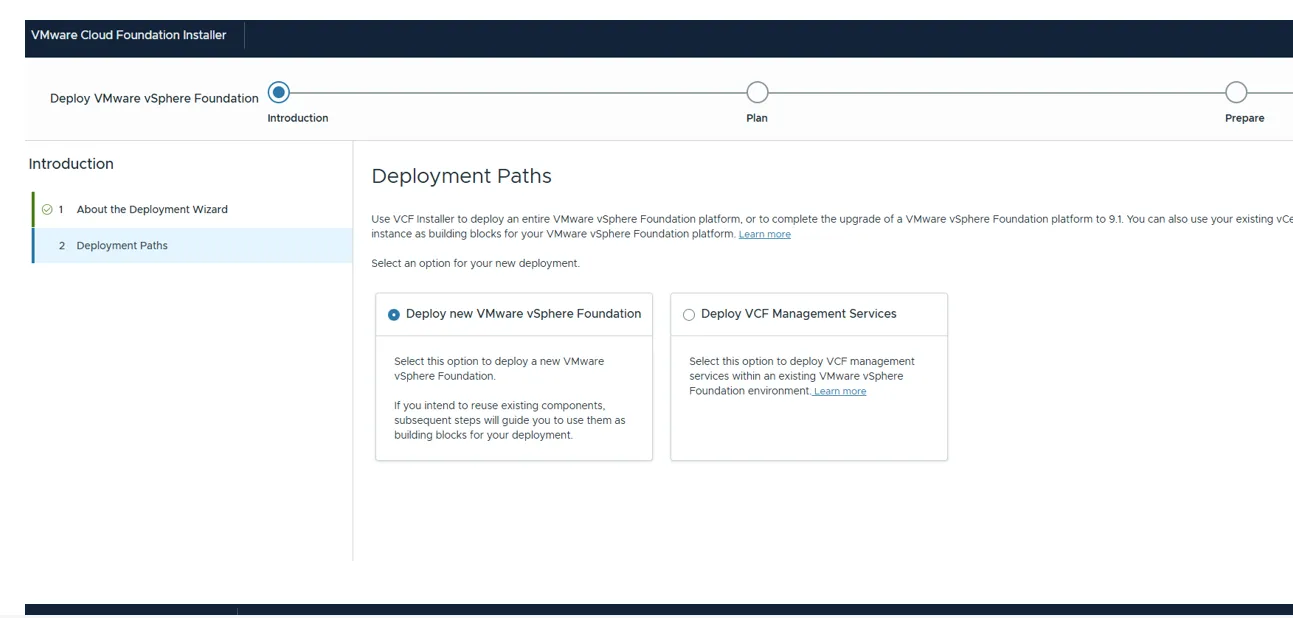
Not verified end-to-end. This walkthrough follows the TechDocs procedure. The Deployment Paths screen is confirmed from a real VCF Installer (screenshot below); the later wizard pages and field order have not yet been run through to a deployment. Check each screen against the live wizard.
What you end up with
The wizard installs the VCF services runtime, Fleet lifecycle, SDDC lifecycle, Software depot and Telemetry. Identity Broker is not part of this procedure – TechDocs doesn’t mention it anywhere on the page, which matches Identity Broker being a VCF-only concern (see Identity Broker migration).
License Server: reused, not duplicated. TechDocs: “For environments, where a license server already exists, this workflow does not deploy a second license server.” On a standalone VVF 9.1 fleet one already exists from the upgrade’s step 2 above, so the wizard deploys one only if it somehow doesn’t.
Version and product requirements
What has to be true before the Deploy VCF Management Services option is usable. TechDocs is explicit about only some of these; the rest follow from what the wizard asks for, and are marked as such. Quotes checked verbatim against the TechDocs page (last updated 2026-09-29).
| Requirement | Detail | Source |
|---|---|---|
| VCF Installer 9.1.1 or later | With the VCF management services and License Server binaries downloaded to it first – online, or via the VCF Download Tool to an offline depot if the Installer has no internet access. | Stated: “Verify that you deployed VCF Installer version 9.1.1 or later.” |
| An existing VMware vSphere Foundation environment | This path adds services to a running VVF; for a new VVF use the other card. Standalone VVF only – no SDDC Manager, which would put you on the full-VCF path instead. | Stated on the wizard card: “deploy VCF management services within an existing VMware vSphere Foundation environment” |
| VCF Operations 9.1.x, already deployed | The wizard needs the existing instance’s primary node FQDN and admin password “to authenticate and register the VCF management services”; it does not deploy VCF Operations. | Stated: “after upgrading VCF Operations and vCenter, you deploy VCF management services and license server.” No minimum build stated |
| vCenter 9.1.x | Upgraded before this step; the wizard asks for the vCenter details. | Stated (same sentence). No minimum build stated |
| ESX | No version stated. The VVF upgrade order puts the ESX upgrade after vCenter, so 8.0 U3 hosts under a 9.1 vCenter aren’t ruled out – unconfirmed. | Not stated |
| License Server | Optional as an input: reused if it exists, deployed if not. | Stated (see above) |
| Identity Broker | Not deployed by this workflow. | Not mentioned on the page |
| vSAN / NSX | Neither required nor excluded by the page. | Not stated |
| No SSL-terminating proxy on VCF Operations | Conditional: only applies when there are additional management components as well. | Stated: “If your environment has additional management components and your VCF Operations has a configured proxy server with SSL termination, you must remove the proxy server configuration before you deploy VCF management services.” |
| Sizing | Deployed at small by default; a larger size needs the JSON specification route instead of the wizard. Node counts and resources are not on the page – the full-VCF equivalent is in Phase 3 sizing. | Stated: “VCF Installer deploys VCF management services for vSphere Foundation with a small component size. To change the component size, you can use a JSON specification file.” |
Before you start
-
FQDNs with forward and reverse DNS for: fleet components, instance components, VCF services runtime (and the License Server, if one doesn’t exist yet). Lowercase only;
.localdomains are not supported, and only internet top-level domains are validated. -
Each of those FQDNs resolves to its own unique IP – TechDocs: “Each Fully Qualified Domain Name (FQDN) must point to a unique IP address that is outside of the IP range of the VCF services runtime.”
-
An IP pool for the services runtime nodes:
- target 9.1.0.0 – 9.1.0.300: a contiguous range, minimum 10 addresses;
- target 9.1.0.400 or later: a comma-separated list, contiguous or not, and you can exclude addresses from the range or list.
For comparison, the full-VCF path sizes the same layer at a /28 with 12 IPs minimum and 30 recommended (see the prerequisites table); leaving headroom here is cheap insurance.
-
An internal cluster CIDR that doesn’t collide with anything routed in your environment – you pick one of
198.18.0.0/15,240.0.0.0/15or250.0.0.0/15. It doesn’t need to be unique per runtime: TechDocs notes that different VCF services runtime instances on the same network can use the same internal network (for example Management Services and VCF Automation). -
VCF Operations primary node FQDN and admin password to hand.
Walkthrough
-
Log in to the VCF Installer at
https://<installer-fqdn>asadmin@local. -
Start the right wizard. Go to Deployment Wizard → VMware vSphere Foundation. On Introduction → Deployment Paths, select Deploy VCF Management Services (the right-hand card), not the default Deploy new VMware vSphere Foundation.
-
Network configuration. Keep the recommended values, or choose Customize if the services need to land on a specific network.
-
Review prerequisites. Use PRE-FILL GENERATED FQDNs IN WIZARD to populate the FQDN fields from a naming template, or enter your own later. Either way, the names must match what’s already in DNS.
-
General configuration. Select the version to deploy (match your pinned target build), your CEIP choice, and whether passwords are autogenerated. Per TechDocs, autogenerated passwords can be retrieved “after the deployment begins” – save them then; if you don’t autogenerate, you enter each one manually.
-
VCF Operations. Enter the primary node FQDN and admin password of the existing VCF Operations instance. The new services register against this instance.
-
vCenter. Enter the vCenter details – this is where the Management Services nodes are deployed.
-
IP pool. Enter the range or list from Before you start. On 9.1.0.400 and later you can also exclude addresses – TechDocs: “Excluded IP addresses cannot be used for deploying additional VCF components.” Add an IPv6 range/list too if dual-stack is enabled.
-
VCF Management Services FQDNs. Enter the fleet components, instance components and VCF services runtime FQDNs.
-
Internal cluster CIDR. Select the IPv4 CIDR (and an IPv6 one, default
fd00::/111, if dual-stack). -
License Server FQDN. IPv4 only at deployment; on vSphere Foundation 9.1.1 and later the networking can be changed to IPv6 afterwards. An existing License Server is reused rather than duplicated – see What you end up with.
-
Validation. Resolve errors, acknowledge warnings. Optionally download the JSON specification here – worth keeping as a record of what was deployed, and it can be edited and re-used for a spec-driven deployment.
-
Deploy, then watch the Tasks panel. Failed tasks can be retried in place after fixing the cause.
After deployment
- Check the services runtime is healthy before building on it – the VCF Inspector “Check Deployed VCF Management Services” mode inspects exactly this layer.
- Next step per Broadcom: Log Management, deployed from VCF Operations (“After that you can deploy log management by using VCF Operations.”). If log management was the reason for adding the layer, continue with Log Management migration.
- Configure backups for VCF Management Services – an unconfigured backup is one of the things VCF Inspector flags.
Extending to full VCF needs a VDS migration first
Extending standalone/VSS-based VVF to full VCF needs a VDS migration first – it is not handled by any VCF workflow. VVF itself has no distributed-switch requirement (a VVF cluster can run on the Virtual Standard Switch indefinitely, same as plain vSphere always could). Full VCF does, for two independent reasons that both land on the same prerequisite:
- NSX only integrates with vSphere Distributed Switch (VDS) on ESXi. Per Broadcom TechDocs, “Managing NSX on a vSphere Distributed Switch”: “In NSX 4.0, you can only use a VDS switch to prepare ESXi host nodes as transport nodes” – N-VDS “is not supported” for that purpose (N-VDS remains valid only for NSX Edge VMs, not ESXi hosts). NSX 4.0+ ships in VCF 9, and NSX is mandatory in full VCF, at minimum for the management domain.
- SDDC Manager / VCF Operations Fleet Management’s own workload-domain automation only creates and manages clusters on VDS – there is no VSS option anywhere in that create/add-cluster flow, independent of the NSX requirement above.
If an engagement is on standalone VVF with VSS today and the fleet is heading toward full VCF (not just adding VCF Management Services), confirm the VSS→VDS migration is scoped as its own prerequisite step before committing to a phase count – it is a manual, per-cluster migration on the vSphere side, not something the VCF Installer or NSX deployment does for you. Full walkthrough: VSS to VDS migration.
Pre-upgrade precheck
With no SDDC Manager on this path, there’s no fleet precheck to run. VDT is the self-service equivalent – run it against every vCenter before the window opens: VDT and lsdoctor: self-service diagnostic tools.
Check every host’s CPU and server model before step 4 (ESX hosts). The ESX 9 installer applies the same rules on this path as on full VCF (KB 318697):
- Discontinued CPU series block the upgrade (e.g. Broadwell, Skylake-D/W, Kaby Lake). Replace those hosts before the window.
- Deprecated series (e.g. Cascade Lake, AMD EPYC 7001/7002) are “still Supported” on all of 9.x and only trigger an installer warning. They are discontinued in the next major release, so plan their replacement.
- Intel Skylake-SP is supported in deprecated mode on 9.x with limitations (KB 428874).
- Also confirm the server model is still on the Broadcom Compatibility Guide. Models marked “VCF Supported. Confirm w/Vendor” get their hardware support from the OEM.
Same rule as the full-VCF prerequisites table.
Check host profile versions before the vCenter step. Host profiles below version 8.0 fail the vCenter 9 pre-upgrade check with an error. Re-extract them from an 8.0 host or delete unused ones first: Host profiles below 8.0 block the vCenter 9 upgrade.
Post-upgrade validation
A trimmed version of the full-VCF checklist – most of that list assumes components (SDDC Manager, NSX, Identity Broker, VCF Automation) that don’t exist on this path:
- Component builds – vCenter, ESX, and Aria/VCF Operations on their expected builds.
- vCenter – work through the post-cutover checks (DRS automation level, licensing and Activate Management, Broadcom’s verify list, plug-ins) in vCenter manual GUI upgrade → After cutover.
- VMware Tools – upgrade guests to 13.1. Also re-verify the ProductLocker shared-repository location on every host, see VMware Tools ProductLocker.
- VM hardware compatibility – bump VM compatibility where appropriate.
- vSAN on-disk format – upgrade the on-disk format version, if vSAN is in use.
- vSAN File Service – upgrade if in use, after the on-disk format upgrade.
- vSphere Distributed Switch – upgrade vDS versions, if a vDS is in use. A vDS with no host members can keep a stale “upgrade in progress” banner afterwards – see the field notes.
- Licensing – vCenter and ESX licenses assigned from the License Server; no connectivity errors between vCenter and the License Server.
- Aria/VCF Operations – reachable and healthy, metrics still flowing.
- Backups – add the new License Server (and a freshly deployed VCF Operations, if there was no Aria Operations to upgrade) to the backup scope; re-verify the vCenter file-based backup runs clean against the new appliance and take a fresh baseline.
Same PowerCLI spot-check as the full-VCF checklist covers builds, VMware Tools, vDS version, and vSAN on-disk format in one pass – see Full VCF upgrade sequence → Post-upgrade validation.
Cleanup
- Pre-upgrade snapshots – delete once the upgrade is confirmed successful; leaving them attached causes performance degradation.
- Old vCenter appliance – the two-stage upgrade leaves the source appliance powered off as the rollback position. Delete it once the upgrade is verified and the rollback window has closed. Until then, never power it on with its network adapter connected – see After cutover.
- Legacy Aria Operations appliances – retire once the transition to VCF Operations 9.1 is confirmed, if applicable.