

Log Insight to Log Management 9.1: what moves, and how
A component-by-component companion to Log Management migration, for the case where the source is Log Insight, also known as Aria Operations for Logs 8.x. Docs/11 says when in the upgrade this happens. This page says how each part of the old instance gets to VCF Operations 9.1 with Log Management, and which parts Broadcom doesn’t document at all.
Everything below comes from TechDocs for VCF 9.1, read word for word on 2026-11-12. Broadcom’s post-migration steps name 8.18 as the source version. The deploy wizard itself says “8.x”. Where a page is silent, this page says so instead of guessing.
The short version
There’s no in-place upgrade: “No direct upgrade path for VMware Aria Operations for Logs 8.x to log management 9.1 exists”. You deploy Log Management 9.1 from VCF Operations next to the old cluster and move things over along five routes:
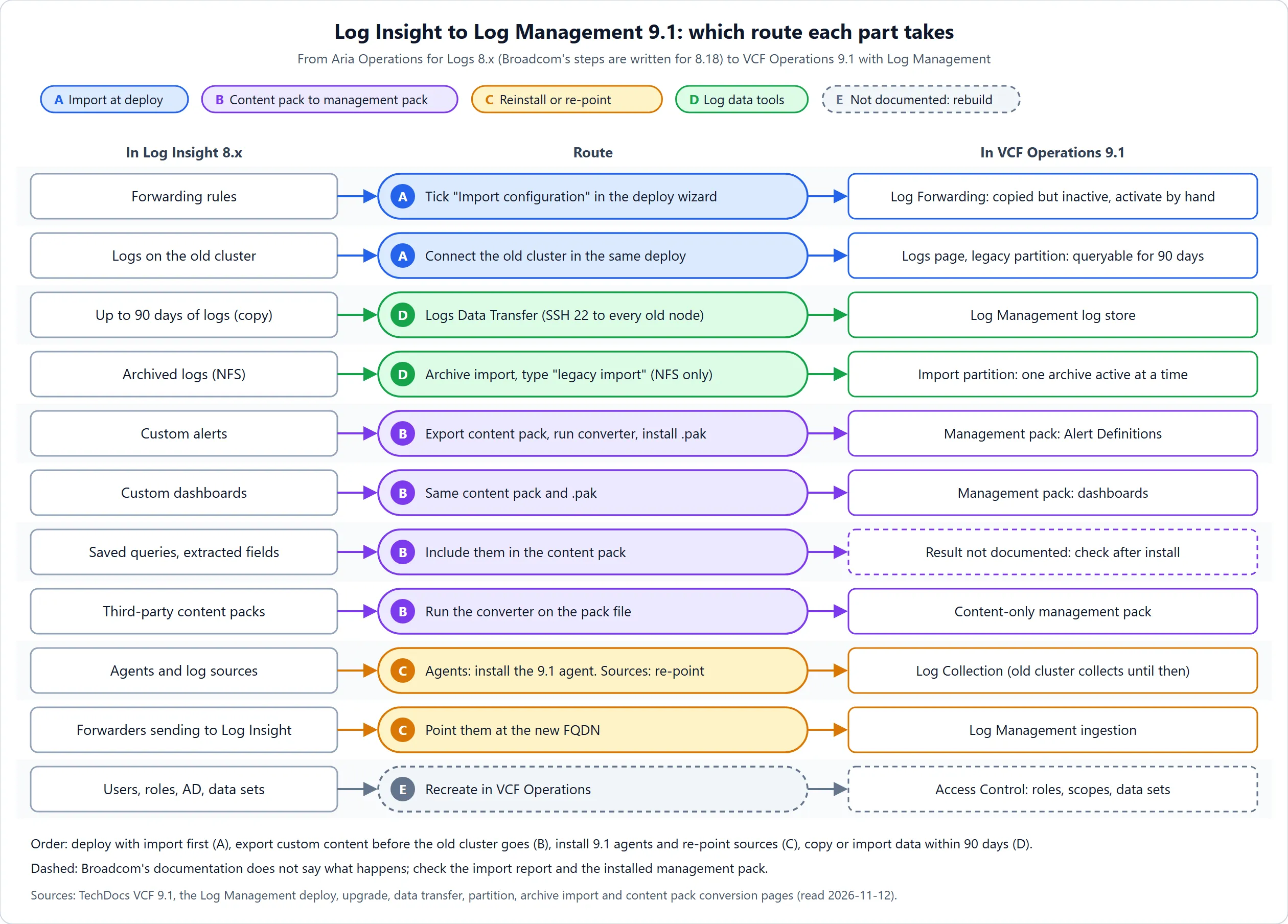
| Route | What it is | Covers |
|---|---|---|
| A Import at deploy | A checkbox in the Log Management deploy wizard | Forwarding rules; the link to the old cluster |
| B Content pack to management pack | Export from Log Insight, convert with Broadcom’s converter, install the .pak in VCF Operations | Alerts, dashboards, other custom and third-party content |
| C Reinstall or re-point by hand | Install the 9.1 agent where you can; change the target on every other sender | Agents, log sources, forwarders that send to Log Insight |
| D Log data tools | Query, copy or re-import old log data | Logs on the old cluster, archives |
| E Not documented | Rebuild it in VCF Operations | Users, roles, authentication, data sets, notifications |
Per component
| In Log Insight 8.x | Route | What you do | Ends up as |
|---|---|---|---|
| Configuration as a whole | A | Tick Import configuration from an earlier Operations for logs instance and give the old FQDN, admin user and password (“Select to migrate a VMware Aria Operations for Logs 8.x configuration”) | An Upgrade report on the deploy task: download it and read what came over |
| Forwarding rules | A | Activate each one: “forwarders are copied over but are not active. You must manually activate them” | Log Forwarding (maximum of 10 rules) |
| Logs still on the old cluster | A | Connect the old cluster during the deploy: “as part of the upgrade workflow, and not later on” | A legacy partition on the Logs page, queryable for 90 days. After that “these legacy partitions will no longer be available for searching” |
| Up to 90 days of logs, copied | D | Operate → Administration → Control Panel → Logs Data Transfer → Initiate Transfer | Logs in the Log Management store |
| Archived logs | D | Archive import with operation type legacy import: “Legacy Import supports only NFS storage” | An import partition. “only one imported log archive can be active for querying at a time” |
| Custom alerts | B | Content Packs → My Content → Export, convert, install (steps below) | Operate → Configuration → Alert Definitions |
| Custom dashboards | B | Same content pack | Dashboards in the management pack: “you can see the dashboards, alerts, and symptom definitions that originated from the original content pack” |
| Saved queries, extracted fields | B | Include them in the content pack. For alerts, select them “along with their associated extracted fields” | Not documented. Broadcom names “dashboards, queries, alerts” as custom content that goes this way, but lists only dashboards, alerts and symptom definitions in the result. Check after install. 9.1 has its own Fields Library with export/import between VCF Operations instances |
| Third-party content packs | B | Run the converter on the pack file | A “content-only management pack” (no metrics) |
| VMware content packs | – | Nothing to move: “Content packs have been deprecated in VCF Operations 9.1 and they have been replaced with the content integrated into management packs” (KB 443089) | Built-in management pack content |
| Agents | C | Install the 9.1 agent and point it at the new FQDN. Re-pointing the 8.x agent is only the fallback for an OS the 9.1 agent doesn’t support (Route C). From 8.18 this is manual; the old cluster keeps collecting until you do | Log Collection. Agent authentication needs “agent version 9.1 or higher” |
| Log sources (vCenter, ESX, NSX and so on) | C | “Reconfigure required log sources to point to your new instance” | Log Collection |
| Forwarders that send to Log Insight | C | “you must reconfigure the log forwarder to send logs to the new 9.1 log management component FQDN” | Log Management ingestion |
| Users, roles, AD / VIDM login | E | Not documented for a Log Insight import. Recreate them in VCF Operations | Log access is “converged into the VCF Operations role based access control”: Access Control → Roles, Scopes |
| Data sets | E | Not documented. Recreate them as a Log Data Set in a Scope | Access Control → Scopes → Assign Log Data Set |
| Index partitions, retention | E | Not documented. Recreate them as log partitions | Administration → Configurations → Log Processing → Log Partition |
| Archiving to NFS | E | Not documented. Set archiving on each log partition (NFS or S3) | Log Partition → Enable Archive |
| Alert notifications (email, webhook) | E | Not documented for a Log Insight import. Log-based alerts are now VCF Operations alerts, so they use VCF Operations notifications | VCF Operations alert notifications |
| Integration with Aria Operations | – | Gone: “VCF does not permit integration of VCF Operations with Aria Operations for Logs” | Logs live inside VCF Operations |
Anything marked “not documented” may still come across with the import. The import report is the place to check, item by item, before you rebuild anything.
Order of work
- Prepare.
- A new FQDN for Log Management. It must be lowercase and must not point at a VCF services-runtime IP. Put it on the management network that hosts VCF Management Services: Log Management “cannot deployed on a custom NSX overlay network”.
- Firewall: the import talks to the old cluster on 9543/TCP (see firewall flows in the deployment-planning guide). The data transfer needs SSH, see step 6.
- Deploy with import (A). VCF Operations → Build → Lifecycle → VCF Management → Components → Add component → Log management. Tick the import, give the old instance’s FQDN and admin credentials, and keep the link to the old cluster. You can’t add it later.
- Read the upgrade report. Tasks → the Log Management task → Upgrade report. This tells you which of the “not documented” rows above you still have to rebuild.
- Export custom content while the old cluster is still there (B). Do this before you power anything off: once the old cluster is gone, there’s nothing to export from.
- Move collection (C). Replace the agents with the 9.1 agent (see Route C: the agents), then re-point log sources and anything that forwards into Log Insight. Then activate the copied forwarding rules (A).
- Move the log data you need (D), within 90 days.
- Logs Data Transfer copies up to 90 days. “All source nodes of the Aria Operations for Logs instance must have the same SSH credentials as each other, and be reachable via port 22 from the Log Management nodes”. Not all buckets are copied without enough free disk space, so check that first. Broadcom suggests starting with the last 10 days. The transfer also needs the Cloud Proxy in split-proxy mode; see the field note in docs/11.
- Archives: use legacy import, NFS only, a small time range at a time. “if the import logs fill the storage more than 80%, the task fails”.
- Rebuild what didn’t come over (E). Roles, scopes and data sets, partitions and archiving, notifications.
- Decommission. After the post-migration steps, “you can shut down and remove the legacy appliances”. The 90-day query window closes on its own either way.
Route B: custom content
From Converting Custom Log Alerts to Management Packs and Converting Content Packs to Management Packs:
-
Export from Log Insight. Go to Content Packs → My Content → gear icon → Export. Select the alerts, dashboards and queries, plus the extracted fields they use. You can make one pack for everything or several smaller ones. Fields used by what you select go along automatically, but “If the custom dashboards, saved queries, and alerts contain the
_indexfield in their filters, the filters are excluded from the export content” (Export a Content Pack, 8.16). Check those filters after the move. -
Get the converter from the Broadcom Support Portal, under Drivers and Tools, in the log management section. Use
cp-to-mp-convertor-jar-with-dependencies-jdk17.jarfor Java 17 to 24, or...-jdk25.jarfor Java 25 and later. Download the README too. -
Convert on a workstation with Java:
java -jar cp-to-mp-convertor-jar-with-dependencies-jdk17.jar -i <content-pack-file> -o <output-directory>
java -jar cp-to-mp-convertor-jar-with-dependencies-jdk17.jar -f <directory-with-packs> -o <output-directory>
The first converts one pack, the second all packs in a directory. Each pack gets its own output folder with a
.pak, next to the content as separate files (logextractedfields.xml,alertdefs.xml,symptomdefs.xml,dashboard.jsonand others).On a workstation with little free memory, Java can stop right away with “The paging file is too small for this operation to complete” and “There is insufficient memory for the Java Runtime Environment to continue”. A content pack is small, so a small heap is enough:
java -Xms64m -Xmx1g -jar cp-to-mp-convertor-jar-with-dependencies-jdk17.jar ...(seen and fixed in the field, 2026-11-19).A pack that VMware ships itself is skipped (“will be skipped during conversion, since respective content in VCF Operations already exists”) unless you rename the file or add
-force, according to Brock Peterson (community, November 2026). He also shows the converter warning that an extracted field’s regex “is estimated to consume high CPU”. -
Allow unsigned PAKs. In the VCF Operations admin UI (
https://<vcf-ops-fqdn>/admin), go to Administrator Settings → Security Settings → ENABLE UNSIGNED PAK INSTALLATION. Broadcom calls this “a temporary modification of the security posture” but doesn’t give the step to switch it back. Turn it off yourself after the last install. -
Install the
.pak. Broadcom gives two routes, one per page:- the alerts page: in the admin UI, Software Install → Install Software Update, with Ignore the PAK File Signature Checking ticked;
- the content pack page: in VCF Operations, Operate → Administration → Integrations → Repository → ADD → BROWSE, and “Install the pack file even if it is already installed and ignore signature checking”.
Either way the result is “a content-only management pack, meaning it will not have any metrics and the source is content pack converter tool”.
Only the extracted fields? Skip the
.pakand importlogextractedfields.xmlfrom the output folder: Operate → Administration → Configurations → Log Management → Fields Library → IMPORT (Brock Peterson, above). Dashboards and alerts don’t come along that way. -
Check under Operate → Configuration → Alert Definitions (alerts) and the management pack’s content tab (dashboards, symptom definitions). Then look for your saved queries and extracted fields, which the pages don’t cover.
Route C: the agents
The import doesn’t touch the agents. From 8.18, “you must manually reconfigure the agents and log sources”, and until you do, “legacy appliances continue collecting data”. That gives you room to move them in batches without a gap.
Plan on reinstalling, not re-pointing. For most agents the move means installing the 9.1 agent, not editing the old one:
- Agent authentication needs agent “version 9.1 or higher”, so an 8.x agent can never send a token (step 5).
- An 8.x agent trusts Log Insight’s certificate, not the new one (step 2).
- Broadcom doesn’t say an 8.x agent is supported against Log Management 9.1, or that it auto-updates to 9.1 once it points there. The closest statement is about 9.0: KB 402647 calls the 8.18.x Windows agent “backwards compatible” with VCF Operations for Logs 9.0.x, adds that it “will not be able to automatically trust” the 9.0.x server, and for 9.1.x points to the Fluent Bit MSI instead.
Re-pointing the existing agent is the fallback for a host whose OS the 9.1
agent doesn’t support, and a reason to plan that OS upgrade. What you do
with each agent depends on what it runs on, because the 9.1 agent supports
far fewer platforms than the Log Insight agent did. Installing a new agent from scratch (download, rpm -i /
dpkg -i, secrets) is covered in the deployment-planning guide,
Log Management §4.
This section is about the move.
1. Sort the agents first
Take the agent list from Log Insight (Management → Agents: hostname, OS, agent version, agent group). Then put every agent in one of these groups:
| Agent runs on | 9.1 agent? | What to do |
|---|---|---|
| Linux, supported OS: RHEL 9/10, SLES 15 SP7/16, Ubuntu 22.04/24.04/26.04 LTS, Debian 12/13, Photon 4.0+, with OpenSSL 3.0+ and systemd 235+ | Yes | Install the 9.1 agent (RPM or Debian package via Log Collection → Agent → DOWNLOAD AGENT) and point it at Log Management |
| Linux, older OS (for example RHEL 8, Ubuntu 20.04, SLES 12) | No. Not on the 9.1 list | Not documented. Options until the OS is upgraded: re-point the existing 8.x agent and test it (step 2), send syslog, or use a third-party shipper such as Fluent Bit. Plan the OS upgrade, then install the 9.1 agent |
| Windows Server 2022 / 2025 | No native agent in 9.1: “For windows systems, see, Set up the Windows system to collect logs” | Replace the Log Insight Windows agent with Fluent Bit (step 3) |
| Windows Server 2019 or older | No | Not documented. Fluent Bit is documented for 2022 and 2025 only |
| VCF components with an embedded agent (shown as VCF Component = yes) | Built in | Leave them. “These agents are not configurable”; they follow the log source configuration in VCF Operations |
| Agents you installed on VMware products yourself (vCenter per KB 371900, SDDC Manager per KB 396643) | Depends on the appliance | Check first whether VCF Operations now collects that product as a log source. If so, remove your own agent so logs don’t arrive twice. vCenter 9.1 does this for you: it “ships with the Log Insight Agent”, and the upgrade to 9.1 deletes a previously installed agent, its configuration and any syslog targets (KB 433089); enable vCenter log collection in Log Management instead. SDDC Manager on VCF still needs the script: see planning guide 05 §B.6 |
2. Linux: install the 9.1 agent, re-point only as a fallback
On a supported OS, install the 9.1 agent: download the RPM or Debian
package from Log Collection → Agent → DOWNLOAD AGENT, set the Log
Management FQDN (and a secret if you’ll use authentication), and remove
the old Log Insight agent so the host doesn’t run two. Do this host by
host or in batches; the old cluster keeps collecting from the hosts you
haven’t done yet.
Fallback: re-point the 8.x agent. Only for a host whose OS the 9.1
agent doesn’t support, and only after testing it against Log Management.
Change the target in /etc/liagent.ini under [server].
These are the settings Broadcom uses in its 8.x KBs (371900, 386897); the
9.1 pages show hostname, proto=cfapi and secret:
[server]
hostname=<log-management-fqdn>
proto=cfapi
port=9543
ssl=yes
ssl_ca_path=/etc/ssl/certs/<log-management-ca>.pem
Then restart it with systemctl restart liagentd and watch the agent
appear in VCF Operations under Log Collection → Agents. Check Status,
Last Active and Events Sent. Allow a few minutes for detection.
Certificate trust is the trap. KB 386897: “When the agent is
initialized, the default behavior is set to trust any certificate. Once
the agent has established a trust relationship with the Aria Operations for
Logs server, any subsequent certificate renewal will require updating the
agent configuration.” An agent that already talks to Log Insight trusts
Log Insight’s certificate. Log Management has a different one, so an agent
you only re-point will most likely fail the TLS handshake. The KB covers a
certificate renewal; a new server is the same situation. Give the agent
the Log Management CA with ssl_ca_path, or put that CA in the OS trust
store and set ssl_accept_any_trusted=yes.
3. Windows: Fluent Bit replaces the agent
From Set up the Windows system to collect logs in VCF Operations:
- Windows Server 2022 or 2025, admin access, and outbound 9543/TCP to the Log Management VIP.
- The custom 64-bit Fluent Bit MSI from the VCF Solutions Catalog, and
the Log Management CA certificate. Silent install:
msiexec /i fluent-bit-4.2.3-win64.msi /quiet /norestart. - Broadcom’s
fluent-bit.confreads the Application, System and Security event logs (winevtlog) and sends them over HTTPS to/api/v2/eventson port 9543, withtls.verify On. Register it as a service (New-Service fluent-bit ...) and check withTest-NetConnection <fqdn> -Port 9543. - Uninstall the Log Insight Windows agent once Fluent Bit delivers, so the host doesn’t send to both.
What changes for you:
- Text log files. A Log Insight Windows agent that collected text log files (FileLog sections) has no counterpart in Broadcom’s configuration, which only reads event logs. You’d have to add your own Fluent Bit inputs for those, and Broadcom doesn’t document that.
- No central configuration. Fluent Bit doesn’t take configuration from
Log Management agent groups. You manage
fluent-bit.confper server yourself. - No authentication. “Windows agents are not supported” for agent authentication, and third-party agents need a manual secret-to-token exchange (see step 5).
4. Agent groups and updates
Agent groups from Log Insight, including the ones that came with content packs, aren’t mentioned for the import. Expect to recreate them under Log Collection → Agent Group:
- Filters on IP address, hostname, version or OS. Several filters combine with AND, several values of one filter with OR, and wildcards work.
- Configuration through the form or Code View, or from a template that a management pack provides. It’s applied “within 5 minutes”.
- One group per agent. “An agent can technically belong to multiple agent groups; however, in such cases, the applied configuration is non-deterministic.”
- Embedded agents on VCF components “cannot be added to agent groups”.
Auto-update is off unless you turn it on: either per group (Auto update for all Agents) or with the global Auto Upgrade Agents Group toggle on the Agents page, which “defaults to false”. It doesn’t work for agents that send through a Cloud Proxy Log Forwarder. Whether an 8.x agent auto-updates to 9.1 once it points at Log Management isn’t documented. Don’t count on it; install 9.1 where the OS allows it.
5. Enforce authentication last, if at all
Authentication is optional by default. Enforcing it is a global setting that drops “any ingestion request without a valid Bearer token”. Before you enforce it, every HTTP sender must have a token:
- 9.1 agents: add
secret=<value>under[server]inliagent.ini. The agent swaps it for a token and renews it automatically. Secrets require agent “version 9.1 or higher”. - 8.x agents can’t do this. Replace them first.
- Fluent Bit and other third-party shippers have “no built-in mechanism to exchange secrets for tokens”. You script that yourself.
- Syslog is not affected: “Legacy Syslog ingestion remains unauthenticated”.
So the safe order is: move all agents, replace the 8.x agents, sort out tokens for third-party shippers, and only then enforce authentication.
Gotchas
- The old link can’t be added afterwards. Connecting the old cluster for 90-day queries only works during the deploy.
- 90 days is a hard edge. The legacy partition disappears after 90 days. The data transfer also covers at most 90 days. Older data only survives through archives.
- Data transfer re-imports in full. “Data for any selected interval is fully re-imported. Check the audit record to avoid redundant transfers.”
- Agent authentication is new and optional. Enforce it only after every agent has moved and can send a token; see step 5 of Route C.
- Re-pointing an agent is the exception, not the plan. Broadcom only says to “reconfigure the agents”; whether an 8.x agent works against Log Management 9.1 isn’t stated (only 9.0 has a “backwards compatible” line, KB 402647), and it can’t authenticate. Install the 9.1 agent wherever the OS allows it, and keep the re-pointed 8.x agents on a list until their OS is upgraded.
- Scopes don’t limit logs. “Object Scopes and Log Data Sets are independent”. Giving a user Cluster A doesn’t limit their logs to Cluster A; only the Log Data Set does.
Sources
TechDocs for VCF 9.1, all read word for word on 2026-11-12:
- Deploy Log Management: import option, upgrade report, post-deployment actions
- Upgrade to Log Management 9.1: no direct 8.x path, overlay restriction
- Log Data Transfer
- Log Partitions and Searching Older Partitions and Configuring Log Partitions
- Archive Log Import
- Configuring Log Forwarding
- Agent Authentication for Log Ingestion
- User Management and Role-Based Access Control
- Overview of Log Management Agents, Configuring Agents, Configuring Agent Group and Set up the Windows system to collect logs
- Query Management: Fields Library
- Converting Content Packs to Management Packs and Converting Custom Log Alerts to Management Packs
- KB 441532: alerts not transferred from 9.0.x (same route)
- KB 443089: content packs deprecated in 9.1
- KB 386897 and KB 371900: Log Insight 8.x agent settings and certificate trust
Re-read word for word on 2026-11-16: the upgrade page’s post-upgrade actions, Overview of Log Management Agents, Agent Authentication and Configuring Agents (no change), plus: